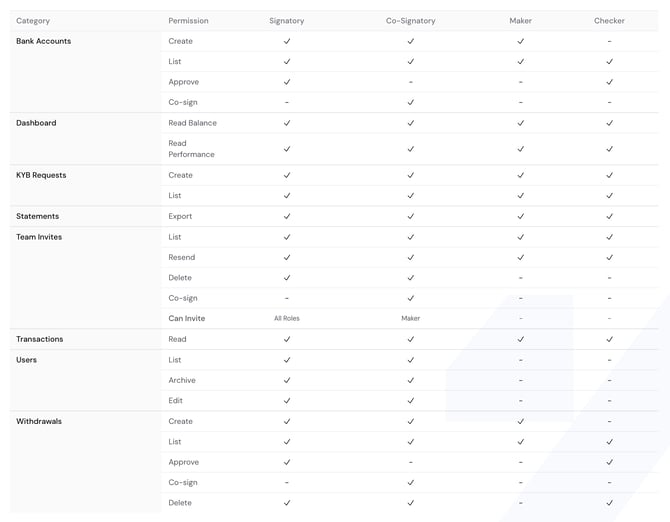
Granite uses a clearly defined permission model with four distinct roles to safeguard your corporate account and maintain operational integrity:
1. Signatory (Full administrative authority)
The Signatory is the super admin. They have full control over the account, including:
-
Creating and approving bank accounts and withdrawal requests
-
Managing the team (add, edit, archive)
-
Inviting users across all roles
-
Full access to dashboards, KYB requests, and statements
2. Co-Signatory (Joint executive authority)
Co-signatories can initiate key actions but cannot finalize them alone:
-
They can create but not approve bank accounts and withdrawals without a second signatory
-
Can only invite Makers to the platform
-
Have read access across all financial and compliance data
3. Maker (Operational input role)
Makers handle day-to-day setup but don’t approve or authorize:
-
Can create and list bank accounts and withdrawal requests
-
No authority to approve, co-sign, or manage users
-
Can view dashboards and KYB data for task support
4. Checker (Review and validation role)
Checkers focus on oversight and internal controls:
-
Can approve or delete requests but not create them
-
No user or team management access
-
Full visibility on reports, dashboards, and transactions
This layered structure ensures no critical action is completed without proper review and separation of duties.
For a quick comparison, see the summary table below.